





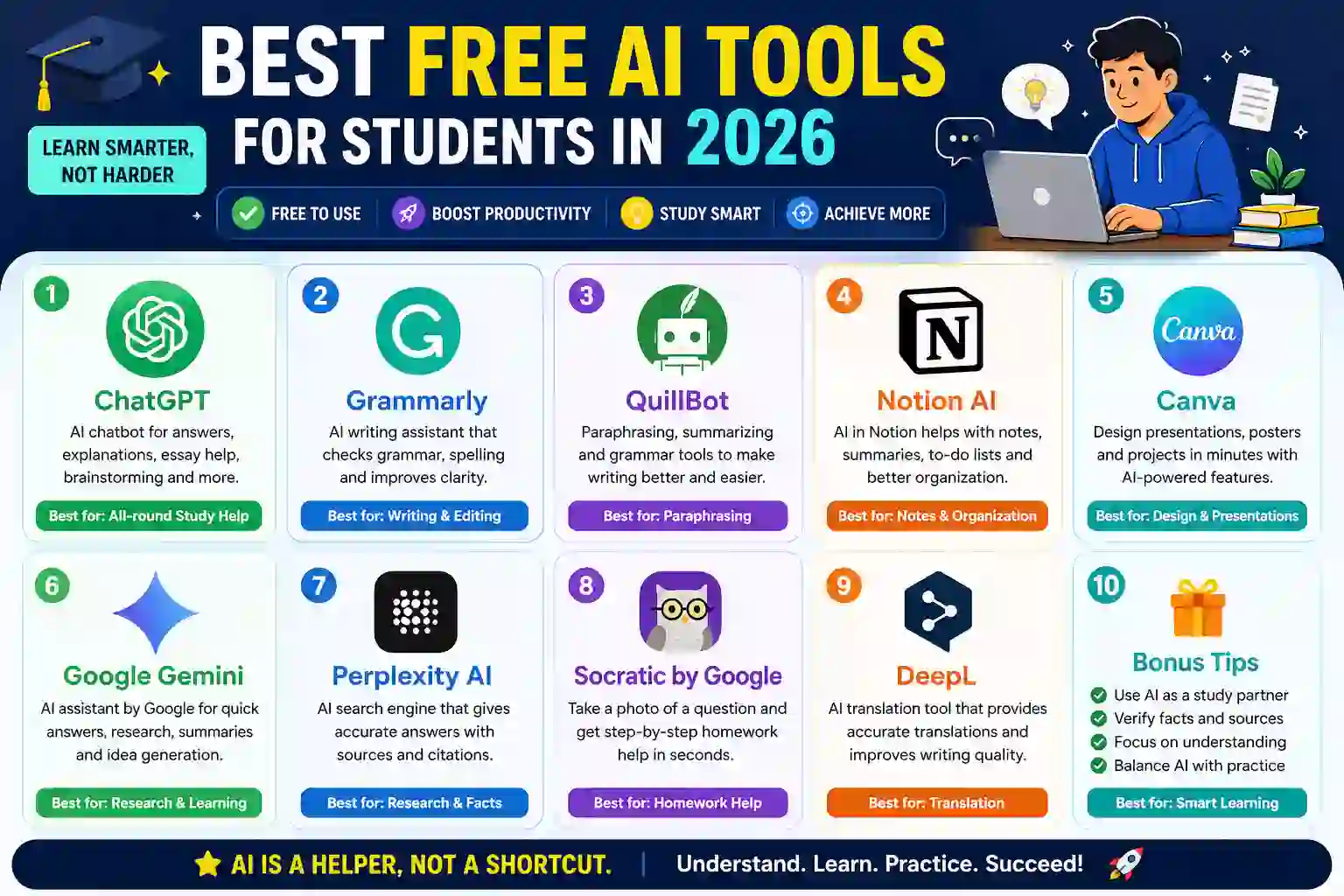
AI has changed how students study. In 2026, things feel faster and easier. With the Best Free AI Tools for Students in 2026, you can write, research, and plan in less time. No need to struggle for hours. These tools help you stay focused and get better results. Even on a tight budget, you can still study smart and keep up with your work.
Why Students Need Free AI Tools in 2026
Study pressure is real. Deadlines come fast. Distractions are everywhere. That’s where AI helps. It speeds up research. It improves writing. It explains tough topics in simple words. Students in places like Pakistan, the US, the UK, India, and Bangladesh also face budget limits, so free tools matter more. You get smart help without paying anything. It’s like having a tutor, editor, and planner in one place
How to Choose the Right AI Tool as a Student
Not every AI tool will fit your needs. Some focus on writing. Others help with research or notes. Start simple. Pick tools that are easy to use. Look for clean design and fast results. Check if the tool gives accurate answers. That matters for exams. Also, choose tools that save time, not waste it. Free plans should be enough for daily study. If a tool feels confusing, skip it. Keep it practical.

1. ChatGPT
This tool is everywhere now. And for a reason. It helps students write essays, fix grammar, and explain hard topics in simple words. Best Free AI Tools for Students in 2026 Need ideas. It makes them fast. You can also summarize long notes in seconds. The free version is strong enough for daily study. Just double-check facts when needed
2. Grammarly
Writing clean English matters. This tool fixes grammar, spelling, and tone in real time. Just type, and it suggests better words. It also helps make sentences short and clear. That’s useful for essays and emails. The free version covers the basics well. It’s simple, fast, and reliable for students.
3. QuillBot
Paraphrasing can be tricky. This tool makes it easy. Paste your text, and it rewrites it in seconds. It keeps the meaning but changes the wording. That helps avoid plagiarism. It also has a summarizer and grammar check. The free plan works fine for daily tasks. Use it to polish assignments and save time.
4. Notion AI
Keeping notes organized is tough for students. This tool makes it simple. You can write notes, plan study schedules, and even generate summaries. It turns messy ideas into structured content. It also helps manage assignments in one place. The free version is useful for daily study work. Everything stays neat and easy to find.
5. Microsoft Copilot
This tool works like a smart helper inside Microsoft apps. It helps you write documents, create summaries, and solve problems faster. Students use it for essays, research, and presentations. It can also explain complex topics in simple language. The free access is enough for basic study tasks. It feels like having an assistant inside Word or Edge.
6. Canva
Presentations and projects matter a lot in student life. This tool makes design easy. You can create slides, posters, and assignments in minutes. It also offers AI features like Magic Write for content help. No design skills needed. Just drag, drop, and finish. The free version gives plenty of templates for school and college work.
7. Google Gemini
This tool is built for quick answers and deep explanations. Students use it for research, summaries, and idea generation. It connects well with Google tools like Docs and Search. You can ask complex questions and get simple replies. It’s useful for homework and exam prep. The free version works well for everyday learning tasks.
8. Perplexity AI
Finding reliable information is important for students. This tool works like a smart search engine. It gives direct answers with sources included. That makes research faster and more trustworthy. You can ask questions and get clear explanations in seconds. The free version is strong for assignments and academic work. It helps reduce time spent on endless browsing.
9. Socratic by Google
Homework can get confusing fast. This tool helps students understand problems step by step. You can take a photo of a question and get explanations instantly. It works well for math, science, and general study topics. The answers are simple and easy to follow. It’s especially useful when you’re stuck and need quick clarity. The free version covers most school needs.
10. DeepL
Language can be a barrier for many students. This tool helps break it. It translates text with high accuracy and natural flow. You can also improve writing clarity in different languages. It’s useful for essays, research papers, and global study material. The free version handles most basic translation needs well. It feels smooth and more human than many other translators.
Final Thoughts
AI tools are changing how students learn in 2026. Everything feels faster and more organized now. You don’t need to struggle alone with notes, writing, or research. These free tools can support daily study tasks and reduce pressure. Still, the key is balance. Use AI as a helper, not a shortcut. Learn the concepts. Understand the work. That’s what builds real success in exams and beyond.
Frequently Asked Questions
1. What Are the Best Free AI Tools for Students in 2026?
ChatGPT, Grammarly, QuillBot, Notion AI, Canva, Gemini, Perplexity AI, Socratic, and DeepL are top choices.
2. Are AI Tools Free for Students?
Yes. Most tools offer free plans with basic features for study and assignments.
3. Which AI Tool Is Best for Homework Help?
Socratic and ChatGPT are best for step-by-step homework explanations.
4. Can Students Use AI Tools for Exams and Study?
Yes. They help with revision, notes, summaries, and understanding topics faster.
 Minahil111