





Online gaming has become a giant part of modern entertainment. From fast-paced shooters to competitive multiplayer games, players want smooth gameplay without lag. That’s where gaming routers come in. Many gamers wonder how gaming routers work and why they’re different from regular routers. Well, let’s break it down in simple terms.
In this beginner-friendly guide, you’ll learn what gaming routers are, how they function, and why they can improve your gaming experience.
What Is a Gaming Router?
A gaming router is a specialized internet router designed to provide better network performance for online gaming. While a standard router connects your devices to the internet, a gaming router focuses on speed, stability, and low latency.
In simple words, it prioritizes gaming traffic over other internet activities. So, if someone in your home is streaming movies or downloading large files, your game connection still stays smooth.
How Do Gaming Routers Work?
Now let’s answer the big question: how do gaming routers work?
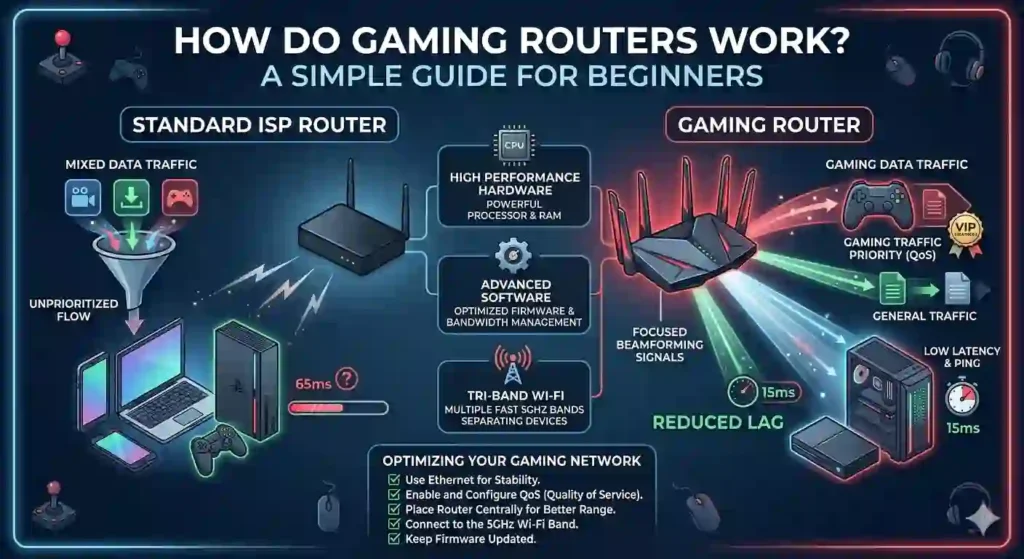
Gaming routers use advanced technologies and smart traffic management to reduce lag and keep connections stable. Instead of treating all internet traffic equally, they identify gaming data and send it first.
Here are the main ways gaming routers make that happen.
1. Quality of Service (QoS) Prioritization
One of the most important features is quality of service, often called QoS.
QoS allows the router to prioritize certain types of internet traffic. Gaming routers automatically recognize gaming packets and give them higher priority than other data like video streaming or file downloads. For example:
- Online game data → highest priority
- Video streaming → medium priority
- File downloads → lower priority
This prioritization helps prevent lag spikes during gameplay.
2. Reduced Network Latency
Latency is the delay between your action and the server’s response. High latency causes annoying lag in online games.
Gaming routers are optimized to reduce latency by:
- Choosing faster network routes
- Managing traffic efficiently
- Minimizing data packet delays
As a result, your commands reach the game server faster. That means smoother gameplay and quicker reactions.
3. Powerful Hardware
Another reason gaming routers perform better is their stronger hardware. Compared to regular routers, gaming routers usually include:
- Faster processors
- More RAM
- High-performance antennas
These components allow the router to handle multiple devices without slowing down. So even if your home has many connected devices, your gaming connection remains stable.
4. Dual-Band or Tri-Band WiFi
Most gaming routers support dual-band or tri-band WiFi.
This means they broadcast multiple wireless frequencies, typically:
- 2.4 GHz band – longer range but slower speeds
- 5 GHz band – faster speeds with lower latency
- Extra 5 GHz band (tri-band routers) – dedicated traffic channel
Gamers often connect to the 5 GHz band because it provides faster speeds and less interference. Some gaming routers even dedicate one band specifically for gaming devices.
5. Device Prioritization
Gaming routers often allow manual device prioritization. This means you can choose which device gets the best internet performance.
For example, you can prioritize the following:
- Your gaming PC
- PlayStation or Xbox console
- Gaming laptop
Once prioritized, the router ensures those devices always receive sufficient bandwidth.
6. Gaming Traffic Detection
Many modern gaming routers automatically detect gaming traffic. They analyze the type of data moving through the network and identify game-related packets.
Once detected, the router routes that traffic using optimized pathways. This reduces congestion and helps maintain stable connections during online matches. So even during busy network usage, your gameplay stays smooth.
7. Advanced Network Management Tools
Gaming routers also come with helpful network management tools. These tools often include:
- Real-time bandwidth monitoring
- Ping and latency tracking
- Network traffic analysis
- Game server optimization
Some routers even allow gamers to connect to the fastest available game servers. This feature can significantly improve online match performance.
Would a gaming router be beneficial for you?
Here’s the honest answer—it depends. A gaming router is most useful if:
- Multiple people share the same internet connection
- You play competitive online games
- You experience frequent lag or high ping
- Your home has many connected devices
However, if you live alone and already have a strong internet connection, a standard router might work fine.
Still, gamers who want every performance advantage often prefer gaming routers.
Tips to Get the Best Gaming Connection
- Even with a gaming router, a few simple steps can improve your experience.
- Use a wired Ethernet connection whenever possible. Wired connections are usually faster and more stable than WiFi.
- Place your router in a central location. This improves signal strength throughout your home.
- Limit background downloads. Large downloads can still affect bandwidth.
- Update router firmware regularly. Updates often improve security and performance.
- Small changes like these can make a noticeable difference during gameplay.
Final Thoughts
So, how do gaming routers work? In simple terms, they improve your internet connection by prioritizing gaming traffic, reducing latency, and managing network resources efficiently.
Thanks to features like QoS prioritization, powerful hardware, dual-band WiFi, and advanced traffic detection, gaming routers help create smoother and more stable online gaming experiences.
For casual players, a regular router may be enough. But for serious gamers who want minimal lag and maximum performance, a gaming router can be a smart investment. At the end of the day, better networking means fewer interruptions, faster responses, and more enjoyable gaming sessions.
And honestly, when you’re in the middle of an intense match, every millisecond counts. 🎮